
Introduction
You launched your website, invested time in design and content, and expected Google visitors to discover your business. But weeks or months later, your website is still not appearing where you expected.
This is one of the most common challenges businesses face. A website can look professional, work correctly, and still struggle to gain visibility because search engines cannot properly crawl, index, understand, or evaluate its pages.
During website audits, a common issue we find is that businesses focus heavily on appearance and content while overlooking technical problems that sit underneath the website. A small configuration mistake can prevent an important page from being discovered. A slow site can create unnecessary friction. A poor internal linking structure can make valuable pages harder to find.
The answer is rarely to publish more content immediately. First, you need to understand what is preventing the website from performing.
This guide explains eight common technical SEO issues that can prevent a website from ranking on Google, how to diagnose them, and what to fix first.
Quick Answer: Why Isn't My Website Ranking on Google?
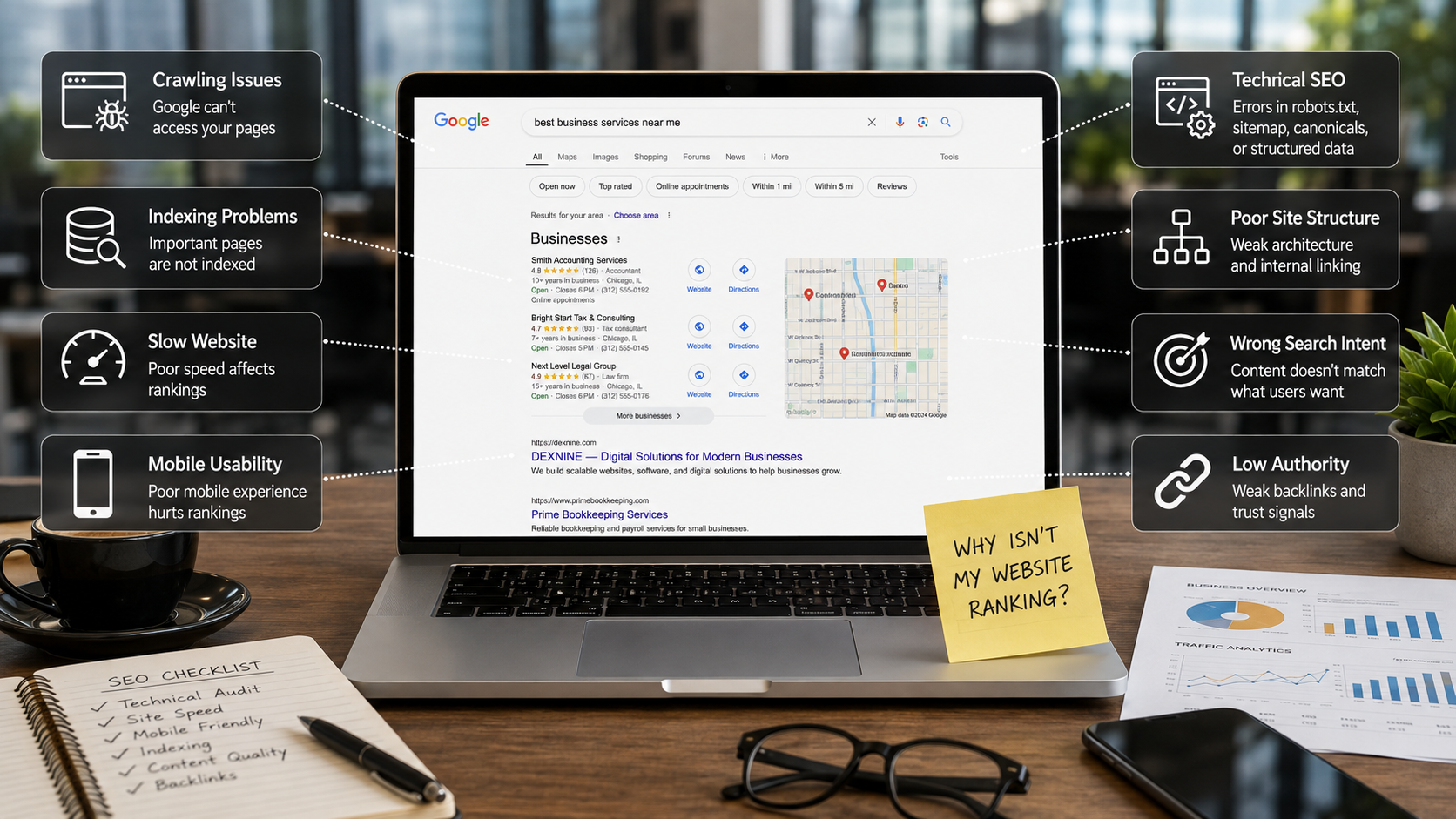
Your website may not be ranking because Google cannot properly crawl or index important pages, the website is slow or difficult to use on mobile devices, technical SEO signals are incorrect, the site structure is weak, the content does not satisfy search intent, or the website has not established enough relevant authority.
- Google cannot crawl important pages.
- Important pages are not indexed.
- The website is slow or unstable.
- The mobile experience is poor.
- Technical SEO configuration is incorrect.
- Website architecture and internal linking are weak.
- Content does not match search intent.
- The website lacks relevant authority and trust signals.
How Google Crawls, Indexes, and Ranks Websites
Before troubleshooting a ranking problem, it helps to separate crawling, indexing, and ranking. They are related, but they are not the same problem.
Crawling
Crawling is how Google discovers URLs and fetches their content. Links, sitemaps, and other discovery mechanisms can help Google find pages.
Google provides detailed guidance on crawling and indexing for site owners who want to understand how search engines process their websites.
Indexing
After a page is discovered, Google may process and store it in its search index. A page being available on your website does not automatically mean it will appear in search results.
Ranking
Ranking happens when Google's systems determine which relevant results to show for a particular search. Technical accessibility is only one part of the overall picture; relevance, quality, user experience, and other signals also matter.
8 Technical SEO Issues Preventing Your Website From Ranking
1. Google Cannot Properly Crawl Your Website
One of the first things to investigate when a website receives little or no organic traffic is whether Google can access its important pages.
Incorrect robots.txt Configuration
The robots.txt file provides crawler instructions. A poorly configured rule can unintentionally restrict access to pages or resources that should be available to search engines.
Use Google's robots.txt documentation when reviewing crawler directives.
Broken Internal Links
Search engines discover many pages through links. If an important service page is isolated from the rest of the website, it can be harder for users and search engines to understand its importance.
Server Errors
Repeated 5xx errors, timeouts, or hosting failures can interfere with reliable crawling. If important URLs frequently fail, investigate the server before assuming the content itself is the problem.
How to Fix Crawling Problems
- Review Google Search Console.
- Check robots.txt.
- Validate the XML sitemap.
- Find broken internal links.
- Review HTTP status codes and redirects.
- Investigate recurring server errors.
2. Important Pages Are Not Indexed
A page cannot attract organic search traffic if it is not eligible to appear in Google's index. This is particularly easy to miss after a website launch, redesign, migration, or CMS change.
Check Indexing
A basic site search can give you a rough indication of indexed pages, but Google Search Console is a better diagnostic tool because it lets you inspect individual URLs and review indexing information.
For practical diagnostics, use Google Search Console and its URL Inspection tools.
Accidental Noindex Directives
A noindex directive tells search engines not to include a page in search results. This can be useful for private, utility, or low-value pages, but it is a serious problem if applied accidentally to an important service or landing page.
Incorrect Canonical Tags
Canonicalization helps search engines understand the preferred URL when similar or duplicate versions exist. Problems occur when an important page points its canonical signal somewhere else or when URL variants are handled inconsistently.
Google's canonicalization documentation explains how canonical URLs are selected and which signals Google considers.
Thin or Low-Value Pages
Not every URL needs to be indexed. Websites often accumulate duplicate, automatically generated, placeholder, or very low-value pages. The goal is not to force every URL into Google; the goal is to make the pages that matter genuinely useful.
3. Your Website Is Too Slow
A website can be visually impressive and still perform poorly. Large files, inefficient scripts, slow servers, and unnecessary third-party resources can make a page feel frustratingly slow.
Large Images
Unoptimized images are one of the most common sources of unnecessary page weight. Use appropriate dimensions, modern formats, compression, and responsive image delivery.
Excessive JavaScript
JavaScript is essential for many modern websites, but unnecessary scripts can delay rendering and interaction. Review large bundles, third-party scripts, unused code, and rendering dependencies.
Poor Hosting or Server Response
If the server takes too long to respond, frontend optimization alone may not solve the problem. Review hosting resources, caching, database performance, and server response time.
Core Web Vitals
Google's Core Web Vitals cover loading performance, responsiveness, and visual stability. The current Core Web Vitals include Largest Contentful Paint (LCP), Interaction to Next Paint (INP), and Cumulative Layout Shift (CLS).
4. Your Website Provides a Poor Mobile Experience
Google uses mobile-first indexing, so the mobile version of a website deserves serious attention. A site that looks excellent on a desktop monitor can still be difficult to use on a smartphone.
Common Mobile Problems
- Text is difficult to read.
- Buttons are hard to tap.
- Pages require horizontal scrolling.
- Navigation is confusing.
- Images and scripts make mobile pages slow.
- Important content is missing or difficult to access on smaller screens.
How to Improve Mobile Experience
Test important pages on multiple screen sizes. Check navigation, forms, buttons, content visibility, image behavior, and performance not just whether the page technically fits on a phone.
5. Your Technical SEO Configuration Is Incorrect
Some SEO problems are invisible to normal visitors. A customer may see a functioning page while search engines receive incomplete or confusing technical signals.
XML Sitemap
An XML sitemap helps search engines discover important URLs. Keep it focused on pages that you want search engines to discover and potentially index.
HTTPS
Serve the website securely over HTTPS and make sure internal links, canonical URLs, redirects, and other signals consistently use the preferred secure version.
Structured Data
Structured data can help search engines understand supported content types. Depending on the page, relevant types may include Organization, LocalBusiness, Article, Breadcrumb, Product, or other supported schema.org vocabulary.
Follow Google's structured data guidelines and only mark up information that accurately represents the page.
Title Tags and Meta Descriptions
Important pages should have descriptive, unique title tags. Meta descriptions should accurately summarize the page and help users understand why the result is relevant. Neither should become a list of repeated keywords.
6. Your Website Structure and Internal Linking Are Weak
A website can contain excellent pages and still underperform if those pages are disconnected from one another.
Example Website Architecture
- Home
- Services → Website Development
- Services → Mobile Apps
- Services → SEO & Performance Marketing
- Services → AI Integration & Solutions
- Work / Case Studies
- Insights / Blog
- Contact
Internal Linking
Internal links create opportunities to connect educational content with commercial pages. Use descriptive anchor text that helps users understand the destination. Avoid forcing the same exact keyword into every internal link.
7. Your Content Does Not Match Search Intent
This is where many businesses make an expensive SEO mistake. They identify a keyword, create a page around it, and assume the keyword itself will make the page relevant.
What Search Intent Means
Search intent is the underlying reason someone made a search.
Example
Someone searching for "Why is my website not ranking on Google?" is probably looking for causes, diagnostic steps, and practical solutions.
A page that immediately says, "We provide SEO services or contact us," does not satisfy that initial need. The commercial offer can appear later, after the page has helped the reader understand the problem.
Match Content to the Search Journey
- Informational: Explain the problem, answer questions, provide examples, and offer practical steps.
- Commercial: Explain the service, process, expertise, deliverables, and suitability.
- Transactional: Make it easy to enquire, request an audit, or start a project.
- Local: Clearly communicate the service, location, service area, and relevant local information.
8. Your Website Lacks Authority and Trust Signals
Technical SEO creates the foundation, but competitive searches usually require more than technical correctness.
Relevant Backlinks
Links from relevant and trustworthy websites can help establish authority and discovery. The emphasis should be on relevance and editorial value rather than collecting links simply for SEO.
Brand Mentions and Profiles
A consistent digital presence across appropriate business profiles, industry publications, partner websites, and professional communities can help establish the identity and credibility of a company.
Demonstrate Expertise
Technology companies should show what they actually know through useful technical articles, project pages, case studies, clear service explanations, author information, and transparent company information.
Avoid Manipulative Link Building
Do not buy links or create large numbers of low-quality links simply to manipulate rankings. Google explicitly treats link spam as a violation of its spam policies.
See Google's spam policies for current guidance on link spam and other manipulative practices.
How to Diagnose Why Your Website Is Not Ranking
If your website is not ranking, do not immediately publish dozens of new articles. Start with diagnosis.
Step 1: Check Indexing
Use Google Search Console to determine whether important pages are indexed and whether specific URLs have indexing problems.
Step 2: Check Crawling
Review robots.txt, sitemaps, internal links, redirects, server responses, and important resources.
Step 3: Check Performance
Measure page performance on representative pages, especially key landing pages and pages receiving organic traffic.
Step 4: Review Website Architecture
Ask whether customers and search engines can easily reach your important services, products, and supporting content.
Step 5: Review Search Intent
Compare the page with the actual needs behind the search query. The best page is not necessarily the longest page; it is the page that solves the searcher's problem effectively.
Step 6: Evaluate Authority
Review relevant backlinks, brand presence, industry recognition, project evidence, and expertise signals.
When Should You Get a Technical SEO Audit?
A technical SEO audit is particularly useful when:
- Organic traffic is consistently low.
- Important pages are not appearing in search.
- Traffic drops unexpectedly.
- A website redesign or migration has recently launched.
- URLs have changed.
- A website has become significantly slower.
- New content is not gaining visibility.
- You are investing in SEO but cannot identify the main barriers.
A useful audit should not simply produce a long spreadsheet of errors. It should explain which problems matter, why they matter, how they affect the business, and what should be fixed first.
Can a Website Redesign Hurt SEO?
Yes. A redesign can improve SEO when it improves architecture, performance, mobile usability, and content organization. It can also cause losses when important URLs disappear, redirects are missing, internal links break, or indexing directives change.
If URLs are changing, create a clear old-to-new URL mapping, implement appropriate redirects, update internal links, and submit the new sitemap.
See Google's guidance on site moves and URL changes before launching a major migration.
Why Does My Competitor Rank Higher Than Me?
Your competitor may rank higher for several reasons. They may have stronger content, better topical coverage, clearer internal linking, more relevant authority, better search intent alignment, or a more established website.
The right response is not to copy their page. Study what the search results reward, identify where your page is weaker, and create something more useful and trustworthy for your audience.
What Should You Fix First?
When a website has many SEO problems, prioritize issues that can prevent everything else from working.
- First: Fix accessibility and indexing problems.
- Second: Resolve critical technical errors, broken URLs, redirects, and canonical problems.
- Third: Improve significant performance and mobile usability problems.
- Fourth: Improve website architecture and internal linking.
- Fifth: Improve content quality and search intent alignment.
- Sixth: Build relevant authority and brand visibility over time.
Technical SEO Audit Checklist
|
Area |
What to Check |
|
Crawling |
Can Google access important pages? |
|
Robots.txt |
Are important pages or resources unintentionally blocked? |
|
Indexing |
Are valuable pages indexed? |
|
Noindex |
Are important pages accidentally excluded? |
|
Canonicals |
Do canonical signals point to the correct URLs? |
|
Sitemap |
Does the sitemap contain important URLs? |
|
Performance |
Are major speed bottlenecks identified? |
|
Core Web Vitals |
Are LCP, INP, and CLS being monitored? |
|
Mobile |
Is the website easy to use on smartphones? |
|
HTTPS |
Is the site consistently served securely? |
|
Architecture |
Are important pages easy to discover? |
|
Internal Links |
Are related pages connected naturally? |
|
Content |
Does each page satisfy the search intent? |
|
Authority |
Does the site demonstrate relevant expertise and trust? |
Frequently Asked Questions
Why Isn't My Website Ranking on Google?
Your website may not be ranking because of crawling or indexing problems, poor performance, weak site architecture, content that does not satisfy search intent, or insufficient authority. Start by checking whether Google can access and index the pages that matter most.
How Do I Know If Google Has Indexed My Website?
You can use a basic site search for a rough indication, but Google Search Console is the better diagnostic tool for checking individual URLs and indexing status.
How Long Does It Take for a Website to Rank on Google?
There is no universal timeframe. Results depend on competition, website history, technical quality, content quality, search intent, authority, and the amount and consistency of work invested in the site.
Can Technical SEO Improve Google Rankings?
Technical SEO can remove barriers that prevent search engines from crawling, understanding, and indexing a website. It does not guarantee a particular position, but it creates a stronger foundation for organic search performance.
Does Website Speed Affect SEO?
Website performance affects user experience and is part of Google's page experience considerations. Significant performance problems should be diagnosed and improved, especially when they affect real users.
What Are the Most Common Technical SEO Problems?
Common problems include crawlability issues, indexing errors, incorrect canonical signals, accidental noindex directives, slow performance, mobile usability problems, broken links, poor architecture, and duplicate or low-value pages.
Can a Website Redesign Hurt SEO?
Yes. A redesign can cause SEO problems when URLs change without proper redirects, valuable pages are removed, internal links break, or technical settings are changed incorrectly.
Should I Hire Someone for a Technical SEO Audit?
If your website has significant traffic problems, complex technical architecture, a recent migration, or unclear SEO issues, a professional audit can help identify and prioritize the work more efficiently.
Final Thoughts
A website that does not rank on Google usually has more than one problem. Sometimes the issue is technical. Sometimes important pages are not indexed. Sometimes the website is slow. Sometimes the content simply does not answer what people are searching for. In competitive markets, the website may also need stronger authority and clearer evidence of expertise.
The important thing is to diagnose the problem before trying to solve it.
Start with the fundamentals: Can Google crawl the website? Are the important pages indexed? Does the website perform well? Is the mobile experience good? Is the site structured logically? Does the content satisfy search intent? Does the business demonstrate genuine expertise?
Once those foundations are in place, content creation, internal linking, digital PR, and authority building become much more effective.
If your website is struggling to gain visibility, Dexnine's SEO & Performance Marketing team can help identify technical, structural, and performance opportunities and create a practical improvement roadmap.
Before investing more time into content or advertising, make sure the foundation is strong.